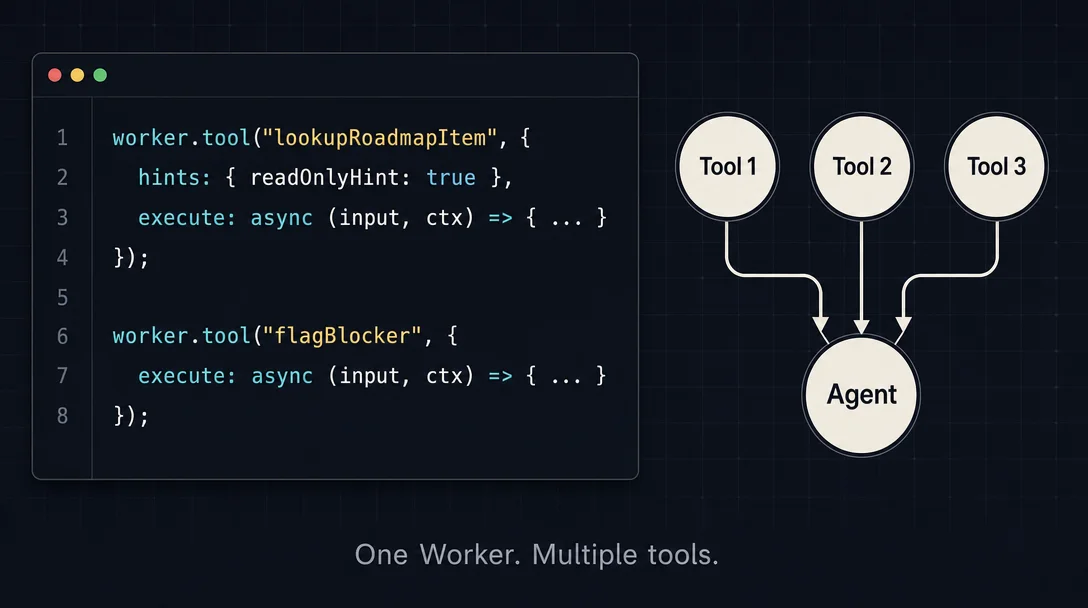
Register multiple tools in one Notion Worker so your Custom Agent can do more than one thing
A Notion Custom Agent wired to a single `worker.tool()` hits a ceiling fast — real PM workflows need both lookup and write operations in the same conversation. This tip shows how to register two `worker.tool()` calls in one `src/index.ts`: a read-only `lookupRoadmapItem` (auto-executes via `readOnlyHint: true`) and a write `flagAsBlocked` (gates on confirmation). The Custom Agent routes between them automatically using LLM function-calling. One `ntn workers deploy` covers both.

リサーチノート
Plan required: Notion Business or Enterprise ($20/user/month minimum). 1
Beta window: Workers are free through August 11, 2026, then billed at approximately $0.0023 per Worker run via Notion Credits. 1
Yesterday's tip showed how to wire up a single
worker.tool() — a sprint-database query the Custom Agent can call on demand. Useful. But real PM workflows rarely need just one operation. You want the agent to look up a roadmap item and flag it as blocked in the same conversation, without two separate Workers and two separate deployments to maintain.Notion Workers supports this directly. A single
src/index.ts file can hold multiple worker.tool() calls — each registering an independent tool with its own schema and execution logic. 2 The Custom Agent sees all of them, picks the right one based on each tool's title and description, and either auto-executes or asks for confirmation depending on whether you've set readOnlyHint: true. 3 One deploy, two capabilities.This tip builds a dual-tool Worker:
lookupRoadmapItem (read-only, auto-executes) and flagAsBlocked (write, requires confirmation).Prerequisites
| Requirement | Details | Where to get it |
|---|---|---|
| Notion Business or Enterprise plan | ntn workers deploy is gated to Business+ | notion.com/pricing |
Notion Internal Integration token (ntn_...) | Authenticates the Worker to read and write both databases | app.notion.com/developers → Create integration |
| Integration capabilities | Read Content + Update Content | Capabilities tab in the integration settings |
Notion CLI (ntn) | Scaffolds and deploys Workers | curl -fsSL https://ntn.dev | bash |
| Node.js 18+ | Required for local development | nodejs.org or nvm install 18 |
| Roadmap database ID | 32-char hex from the database URL | notion.so/workspace/DATABASE_ID?v=… |
| Roadmap database shared with the integration | Both databases need explicit connection | Database → ··· → Connections → select integration |
How the agent picks which tool to call
The Custom Agent uses LLM function-calling to route requests: it reads each tool's
title, description, and every schema field's .describe() annotation, then decides which tool to invoke and generates the typed arguments. 3 No routing table, no explicit branching code — tool selection is entirely driven by the text you write in those three places.Two behaviors differ based on
hints:hints: { readOnlyHint: true }— the agent auto-executes without asking the user for confirmation. Correct for lookups. 4- No
hintsset — the agent treats the tool as a write operation and requests user confirmation before running. 4
This means a read tool and a write tool can coexist in one Worker with different execution behaviors. Thomas Wiegold, an independent developer who shipped a two-tool Shopify Worker four days after the Developer Platform launched, described the result: "One worker, three capabilities. A managed Notion database that holds Shopify orders, a sync that keeps it current every fifteen minutes, and two tools the agent can call." 5 The pattern works for PM toolkits the same way.
A note on scale: a community-built OpenAPI-to-Workers generator (
RavenRepo/notion-workx) documents a platform-enforced ceiling of 100 capabilities per Worker. 6 For a dual-tool Worker you're nowhere near that limit.Step-by-step: build the dual-tool Worker
Step 1: Scaffold the project
ntn workers new roadmap-agent-tools
cd roadmap-agent-tools
Step 2: Write both tools in src/index.ts
Replace the scaffolded file with the following. Both tools share one
Worker instance and one export default.import { Worker } from "@notionhq/workers";
import { j } from "@notionhq/workers/schema-builder";
const worker = new Worker();
export default worker;
// ── Tool 1: read-only lookup ──────────────────────────────────────────────
worker.tool("lookupRoadmapItem", {
title: "Look up roadmap item",
description:
"Returns the title, status, owner, and target quarter for a roadmap item. " +
"Call this when the user asks about the current state or details of a specific roadmap item.",
schema: j.object({
itemName: j
.string()
.describe("The exact name of the roadmap item as it appears in Notion."),
}),
hints: { readOnlyHint: true },
execute: async ({ itemName }, context) => {
const databaseId = process.env.ROADMAP_DATABASE_ID!;
const response = await context.notion.databases.query({
database_id: databaseId,
filter: {
property: "Name",
title: { equals: itemName },
},
page_size: 1,
});
if (response.results.length === 0) {
return { found: false, itemName };
}
const page = response.results[0] as any;
const props = page.properties;
return {
found: true,
itemName,
status: props?.Status?.status?.name ?? "Unknown",
owner: props?.Owner?.people?.[0]?.name ?? "Unassigned",
targetQuarter: props?.["Target Quarter"]?.select?.name ?? "Not set",
notionUrl: page.url,
};
},
});
// ── Tool 2: write — flags an item as Blocked ─────────────────────────────
worker.tool("flagAsBlocked", {
title: "Flag roadmap item as Blocked",
description:
"Updates the Status of a roadmap item to 'Blocked' and optionally writes a reason to the Blocker field. " +
"Call this only when the user explicitly asks to mark or flag an item as blocked.",
schema: j.object({
itemName: j
.string()
.describe("The exact name of the roadmap item to flag."),
blockerReason: j
.string()
.nullable()
.describe(
"Short explanation of what is blocking the item. Pass null if no reason is provided."
),
}),
execute: async ({ itemName, blockerReason }, context) => {
const databaseId = process.env.ROADMAP_DATABASE_ID!;
// Find the page ID first
const queryResponse = await context.notion.databases.query({
database_id: databaseId,
filter: {
property: "Name",
title: { equals: itemName },
},
page_size: 1,
});
if (queryResponse.results.length === 0) {
return { updated: false, reason: "Item not found in database." };
}
const pageId = queryResponse.results[0].id;
const properties: Record<string, unknown> = {
Status: { status: { name: "Blocked" } },
};
if (blockerReason) {
properties["Blocker"] = {
rich_text: [{ text: { content: blockerReason } }],
};
}
await context.notion.pages.update({
page_id: pageId,
properties,
});
return { updated: true, itemName, status: "Blocked", blockerReason };
},
});Match your property names."Status","Owner","Target Quarter", and"Blocker"must match your database's property names exactly. Check them in your database settings before running.
Step 3: Test each tool locally
# Create .env with credentials
echo "NOTION_TOKEN=ntn_..." > .env
echo "ROADMAP_DATABASE_ID=<your-32-char-id>" >> .env

# Test the read tool — no writes to Notion
ntn workers exec lookupRoadmapItem --local -d '{"itemName":"Q3 API Gateway Redesign"}'

# Test the write tool — this WILL update Notion, so use a test item
ntn workers exec flagAsBlocked --local -d '{"itemName":"Test Item","blockerReason":"Dependency on infra team"}'
A successful lookup returns:
{
  "found": true,
  "itemName": "Q3 API Gateway Redesign",
  "status": "In Progress",
  "owner": "Priya Nair",
  "targetQuarter": "Q3 2026",
  "notionUrl": "https://notion.so/..."
}
The write tool returns
{ "updated": true, "itemName": "...", "status": "Blocked", "blockerReason": "..." } on success.Step 4: Deploy
ntn workers env set NOTION_TOKEN=ntn_...
ntn workers env set ROADMAP_DATABASE_ID=<your-32-char-id>
ntn workers deploy
Both tools deploy together in a single command. 7 After deployment, each tool appears independently in your Custom Agent's connection settings — you can enable or disable either one without redeploying. 4
Step 5: Connect to your Custom Agent
Open the Custom Agent's settings, click + Add connection, and select the deployed Worker. Both
lookupRoadmapItem and flagAsBlocked appear as separate toggles. Enable both.Add this to the agent's system prompt:
"You are a roadmap assistant for this team's Notion workspace. When the user asks about the state of a roadmap item, calllookupRoadmapItem. When the user explicitly asks to flag an item as blocked, callflagAsBlockedwith the item name and — if provided — the reason. ForflagAsBlocked, always confirm the item name with the user before calling."
Expected outcome
Ask: "What's the current status of the API Gateway Redesign?" → the agent calls
lookupRoadmapItem automatically, no confirmation prompt, and writes the status summary into the page.Ask: "Flag the API Gateway Redesign as blocked — infra team dependency." → the agent calls
flagAsBlocked, shows a confirmation prompt (because readOnlyHint is absent), and updates the Notion page on approval.Thomas Wiegold observed this loop in action with his Shopify Worker: "The agent called
getCustomerSnapshot, got back a structured payload... and wrote that into the page as a clean summary. Question to answer, maybe four seconds." 5Gotchas
Description overlap causes mis-selection. When two tools have similar descriptions, the agent may call the wrong one. The Notion docs are explicit: "Avoid descriptions that are too broad, such as 'Run support operations'. A narrow description makes the tool easier for the agent to choose correctly." 3 The descriptions above deliberately use different verbs ("returns" vs. "updates") and different trigger phrases ("asks about... state" vs. "explicitly asks to mark or flag"). Wiegold put the stakes plainly: "This took me longer to get right than the rest of the worker combined. The tools." 5
readOnlyHint is advisory, not a permission gate. It controls whether the agent prompts for confirmation; it does not prevent the tool from modifying data if your execute function writes. 4 Keep write operations in tools without readOnlyHint, and keep any actual write logic out of tools marked readOnlyHint: true.Renaming a tool key breaks existing agent configuration. The first argument to
worker.tool() (e.g., "lookupRoadmapItem") is the stable identifier the Custom Agent stores internally. 3 If you rename it after deploying and connecting to an agent, the agent's stored reference goes stale and you'll need to reconfigure the connection.Each tool call bills as a separate Worker run. A single conversation that calls both
lookupRoadmapItem and flagAsBlocked generates two Worker runs — billed separately starting August 11, 2026 at roughly $0.0023 each. 1 For a typical PM using the agent a few times a day, the monthly cost is well under $1, but monitor usage during the free beta with ntn workers runs list to project your post-August bill.The Notion API limit of 3 requests/second applies per integration. Both tools share the same integration token. 8 The lookup tool makes one database query; the flag tool makes two (query + update). Simultaneous agent calls to both tools in a burst can approach the rate limit. If your team's agent triggers frequently, add a try/catch that respects the
Retry-After header on HTTP 429 responses.参考ソース
- 1Notion: Understand pricing for Workers (beta)
- 2Notion Developer Docs: What are Notion Workers?
- 3Notion Developer Docs: How to write an agent tool
- 4Notion Developer Docs: SDK reference
- 5Thomas Wiegold: Notion Workers for Small Business: A Hands-On Guide
- 6GitHub: RavenRepo/notion-workx
- 7GitHub: makenotion/workers-template
- 8Notion Developer Docs: Request limits
このコンテンツについて、さらに観点や背景を補足しましょう。